
DYS Module · Financial Management
CAPEX Management System
Manage investment requests, multi-stage approvals and budget realisation in one portfolio.Bring the whole CAPEX process into one shared management view, from a need turning into a request to the evaluation of the investment and budget tracking.
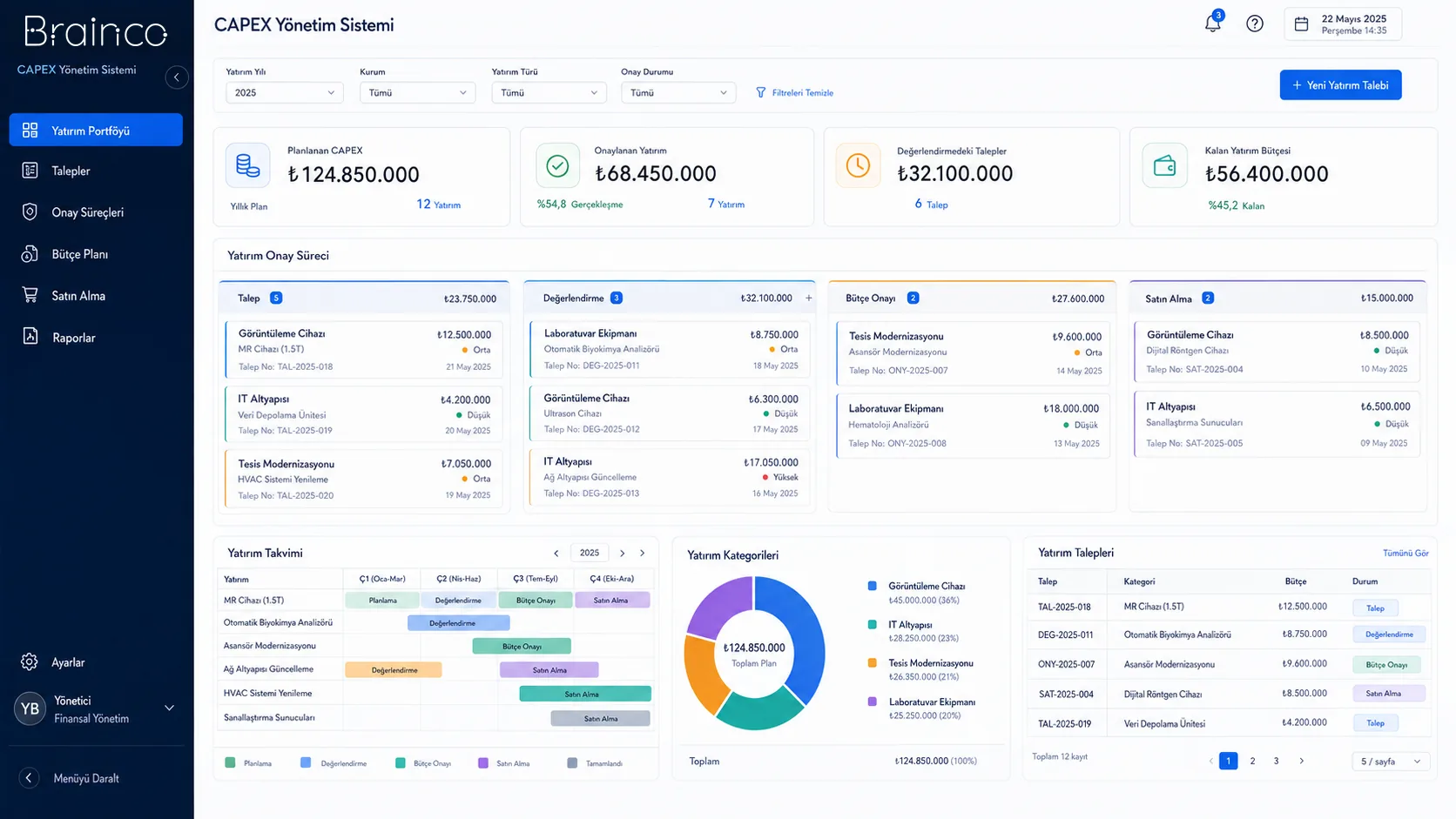
Portfolio view
All investment requests are tracked with their priority and status.
Standard evaluation
Requests are handled with shared information and decision steps.
Budget control
The planned investment budget is compared with actual figures.
Need and solution
From a real business need to a manageable process.
When investment requests move through different files and correspondence, it is hard to compare priorities and keep track of budget use.
The CAPEX Management System moves requests onto a shared form, records the evaluation and approval chain, and makes the investment budget visible at portfolio level.
Core capabilities
What does CAPEX Management System offer?
The main areas of work the product covers in day-to-day use.
Investment requests
Collect need, rationale, budget and timing in a standard structure.
Evaluation
Review requests against shared criteria and supporting information.
Multi-stage approval
Manage decision steps according to authority and responsibility.
Investment budget
Track approved investments by period and budget breakdown.
Planned vs. actual
Compare the investment plan with actual spending.
Portfolio analysis
See the full investment agenda by priority, status and period.
How does it work?
A traceable workflow, step by step.
- 01
Create the request
The department records its investment need with rationale and budget.
- 02
Initial review
The request is checked for scope and completeness.
- 03
Approve
Reviews and approvals are recorded along the defined decision chain.
- 04
Plan
The approved investment is added to the portfolio and the relevant budget period.
- 05
Track actuals
Spending and progress are compared with the plan.
Benefits and measurable indicators
Track improvement with your organisation’s own data.
Instead of ready-made success rates, make visible the indicators that let you monitor process performance regularly.
- 01Request review time
- 02Investments awaiting approval
- 03Investment budget use
- 04Planned vs. actual difference
- 05Portfolio status distribution
Integration approach
Controlled connection to your existing systems.
The scope of integration is configured around the organisation’s data sources, permissions and technical needs.
Security and governance
Authorised access and traceable actions.
- Permission-based approval steps
- Decision and rationale history
- Organisation-specific evaluation flow
- Portfolio change trail
Position in the DYS ecosystem
DYS Module
Let’s evaluate the product together
Manage your investment portfolio from request to realisation in one shared system.
Let’s look at your organisation’s processes, data sources and user needs together.