
Integrated Solution with DYS · Integrated Solutions
Integrated Kiosk Solution
Bring patient admission, registration and wayfinding together in a fast, accessible and traceable self-service experience.Lets patients complete the basic steps at the hospital entrance on a kiosk, and securely links the transaction status with authorised hospital systems and the DYS management layer.
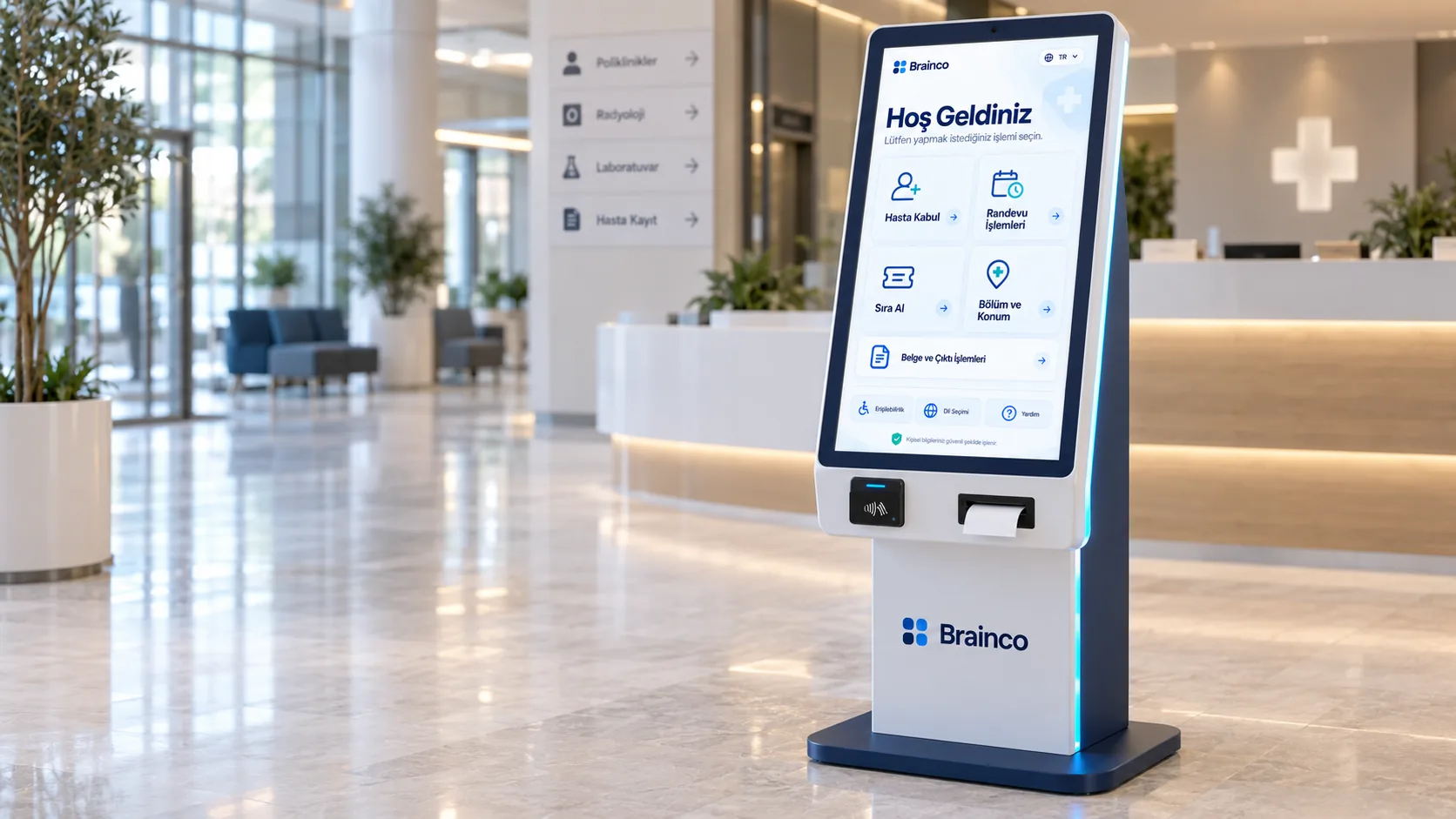
A smoother patient experience
Basic admission and wayfinding steps are offered in a clear self-service flow.
Balanced desk workload
Suitable transactions move to the kiosk, supporting service points at busy times.
Central operations view
Kiosk status and transaction flow can be monitored by authorised teams.
Need and solution
From a real business need to a manageable process.
At busy times, repetitive registration and wayfinding tasks can create queues at the desks and delay patients from reaching the right service point.
The Integrated Kiosk Solution moves the admission and wayfinding steps defined by the organisation into a touch-screen self-service flow, sends the results to authorised systems and makes the operational status visible centrally.
Core capabilities
What does Integrated Kiosk Solution offer?
The main areas of work the product covers in day-to-day use.
Self-service admission
After identity and application checks, complete suitable transactions on guided screens.
Appointments and queues
Display appointment information from authorised sources and handle queueing according to the organisation’s flow.
Department and location guidance
Direct the patient to the right unit, floor or service point based on the result.
Documents and printouts
Depending on configuration, show queue, wayfinding or transaction details on screen or as a printout.
Device status monitoring
Pass connection, peripheral and operating status to a central view for technical teams.
Multi-site management
Manage kiosks at different hospitals and service points with shared configuration and status information.
How does it work?
A traceable workflow, step by step.
- 01
Choose the transaction
The patient selects the transaction on the screen.
- 02
Verify details
The required identity or application details are verified through authorised systems.
- 03
Complete the process
The admission, appointment or queue steps defined by the organisation are carried out.
- 04
Guide
The result and the service point to go to are shown clearly.
- 05
Monitor status
Transaction and device status are passed to authorised operations screens.
Benefits and measurable indicators
Track improvement with your organisation’s own data.
Instead of ready-made success rates, make visible the indicators that let you monitor process performance regularly.
- 01Self-service transaction rate
- 02Average transaction time
- 03Completed transactions
- 04Peak-hour usage distribution
- 05Device availability
Integration approach
Controlled connection to your existing systems.
The scope of integration is configured around the organisation’s data sources, permissions and technical needs.
Security and governance
Authorised access and traceable actions.
- Data use limited to the purpose of the transaction
- Role-based management access
- Transaction and device status log
- Organisation-specific screen and workflow configuration
How it works with DYS
Integrated Solution with DYS
Let’s evaluate the product together
Turn the basic steps at the hospital entrance into a smoother, traceable digital experience.
Let’s look at your organisation’s processes, data sources and user needs together.