
DYS Module · Financial Management
Smart Budget & Planning
Manage the budget cycle from request to actuals tracking in one shared view.Collect budget requests from departments centrally, compare scenarios and track the approved plan against actual figures.
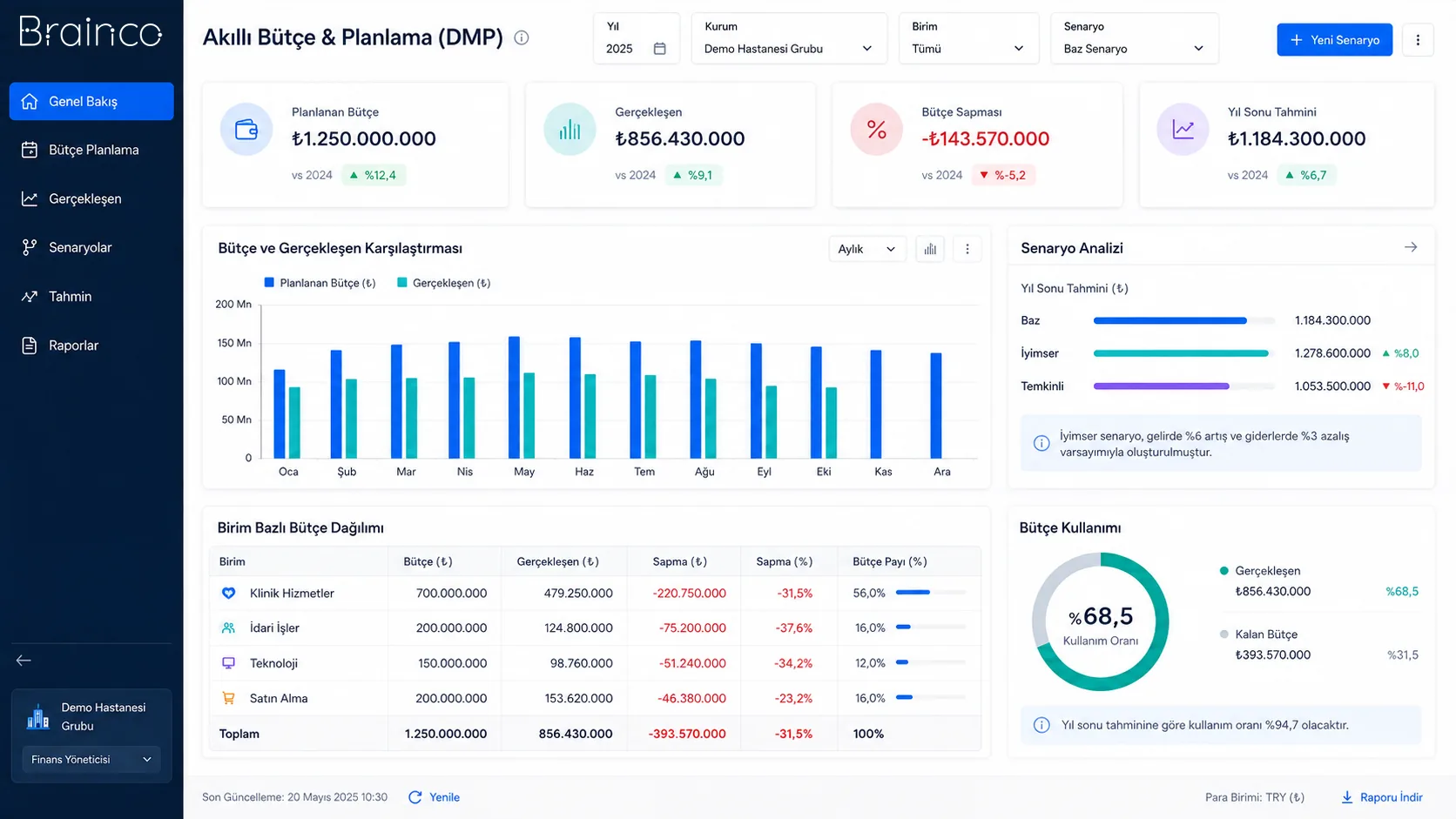
Shared budget memory
Requests, revisions and decisions stay in the same workspace.
Variance visibility
Planned and actual values are tracked by period and department.
Controlled decision flow
Review and approval steps are tracked together with their owners.
Need and solution
From a real business need to a manageable process.
Scattered spreadsheets, multiple budget versions and approvals handled by email make it unclear which plan is the current one.
The product brings budget requests, planning, scenarios, approvals and actuals into a single model, creating a shared way of working between finance teams and business units.
Core capabilities
What does Smart Budget & Planning offer?
The main areas of work the product covers in day-to-day use.
Budget requests
Collect departmental requests in a standard format with period, account and ownership details.
Scenario comparison
Assess alternative assumptions side by side and see the budget impact of each decision.
Plan vs. actual tracking
Compare the approved plan with actual values across shared breakdowns.
Budget variances
Analyse variances by period, department and expense type, and identify areas to follow up.
Revision management
Manage budget versions and the reasons for changes in a traceable way.
Approval processes
Track review steps, owners and current status centrally.
How does it work?
A traceable workflow, step by step.
- 01
Collect requests
Departments submit budget requests within defined periods and breakdowns.
- 02
Build the plan
The finance team consolidates the requests and prepares the working plan.
- 03
Assess scenarios
Alternatives are compared, and revisions and approvals are recorded.
- 04
Track actuals
The approved budget is regularly compared with up-to-date actuals.
- 05
Report variances
Changes that need attention are presented to the relevant decision-makers.
Benefits and measurable indicators
Track improvement with your organisation’s own data.
Instead of ready-made success rates, make visible the indicators that let you monitor process performance regularly.
- 01Budget variance
- 02Request review time
- 03Number of revisions
- 04Approval waiting time
- 05Actuals rate by department
Integration approach
Controlled connection to your existing systems.
The scope of integration is configured around the organisation’s data sources, permissions and technical needs.
Security and governance
Authorised access and traceable actions.
- Role-based budget access
- Revision and approval history
- Organisation-specific periods and business rules
- Transaction-level traceability
Position in the DYS ecosystem
DYS Module
Let’s evaluate the product together
Manage your next budget period with more visibility and control.
Let’s look at your organisation’s processes, data sources and user needs together.